Crew scheduling in minutes
Drag and drop jobs on the calendar and assign crews, employees and equipment. Rescheduling is one move, not ten phone calls.
Construction scheduling software
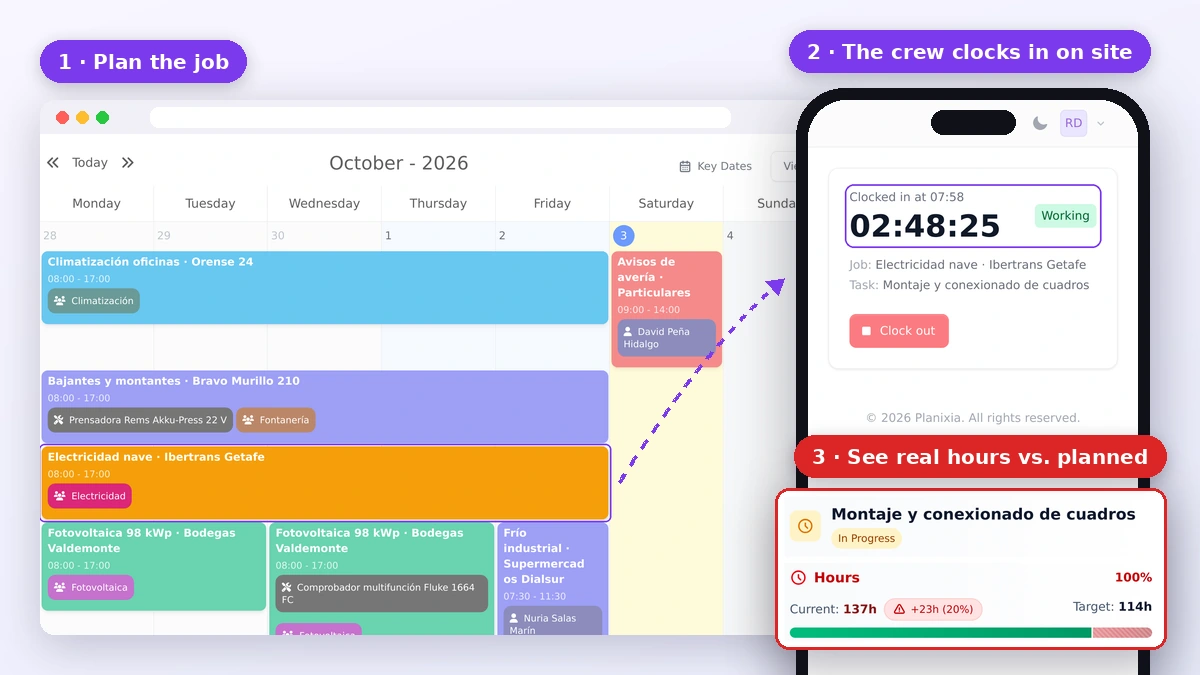
Schedule jobs, crews and equipment on a drag-and-drop calendar. Your team sees the plan on their phone, clocks in on site, and you see real hours against the schedule.
The plan sits on a whiteboard or a spreadsheet in the office, so crews call every morning to ask where they are going.
A delay on one job shifts three others, and the update reaches the crew by text message, if it reaches them at all.
Hours come in on paper at the end of the week, too late to know which tasks ran over and why.
Planixia connects construction scheduling with mobile time tracking and job costing, so the plan, the hours and the costs all live in the same place.
Drag and drop jobs on the calendar and assign crews, employees and equipment. Rescheduling is one move, not ten phone calls.
Each worker sees their own schedule in the mobile browser, with no app to install, and clocks in against the right job and task.
Compare planned vs. actual hours for every task while the job is still running, and get alerts before overruns hit your margin.
Plan the week, let the crew see it on their phone, and track real hours on every task.
Plans have a flat monthly price per company, not per user, with field employees included.
Try it with your real jobs and crews. No credit card required.
Plans from €25/month per company with field employees included. Extra employees cost €1.50/month on Professional and Business.
Crews use Planixia from their phone browser and only see what they need.
Integrations with QuickBooks, Odoo, SAP Business One, Business Central and more on the Business plan.
Start with the schedule and add time tracking and job costing as your team gets used to it.
Drag-and-drop scheduling calendar, including on touch screens.
Assign crews, employees and equipment to every job.
Mobile clock-in with hours logged by job and task, plus optional geofencing.
Daily job reports with progress, incidents, photos and client signature as a PDF.
Job costing: labor, materials, equipment and subcontractors against budget.
Alerts on budget overruns, delayed tasks and jobs with no hours logged.
Assistants that prepare the information while you keep the final decision.
Crew assignment suggestions based on availability, time off and workload.
Daily briefing with the status of every job, progress and pending tasks.
Progress reports ready to review and share with your client.
It is software that replaces the whiteboard or spreadsheet you use to plan jobs. You schedule jobs, crews and equipment on a calendar, everyone sees the same plan, and changes reach the field instantly.
Yes. Each worker opens Planixia in their phone browser, with no app to install, sees their own schedule and clocks in against the job and task they are working on.
Yes. Hours are logged by job and task, and Planixia compares planned vs. actual hours and budget vs. actual costs for labor, materials, equipment and subcontractors.
Plans start at €25/month per company with field employees included, so you do not pay per user. On Professional and Business you can add extra employees for €1.50/month each.
Yes. Every plan includes a 14-day free trial with the features of the plan you choose, and no credit card is required to start.
Try Planixia with your real jobs and see how much time you save on scheduling and phone calls.